How to Download V2Box on Mac (Complete macOS Installation Guide) #
If you are searching for how to download V2Box on Mac, this detailed tutorial will guide you through everything you need to know.
V2Box is a modern multi-protocol proxy client that supports advanced technologies such as V2Ray, VLESS, Reality, Hysteria2, and Trojan. Because of its strong performance and clean user interface, it has quickly become one of the most popular proxy clients for iOS, Android, and macOS.
In this guide, you will learn:
- What V2Box is
- Why it is becoming so popular
- How to download and install V2Box on macOS
- How to import proxy nodes
- How to connect to the internet using V2Box
This tutorial is designed for beginners and advanced users alike.
What Is V2Box? #
V2Box is an open-source proxy client application designed to help users connect to the internet through encrypted proxy protocols.
Unlike traditional VPN services, V2Box itself does not provide servers. Instead, it acts as a client tool that connects to proxy nodes that you configure.
These nodes may come from:
- Your self-hosted VPS server
- A subscription link from a proxy provider
- Manually configured proxy settings
Once configured, V2Box allows you to secure your internet traffic, bypass network restrictions, and improve privacy.
Because it supports many protocols and encryption methods, V2Box is widely used by developers, privacy enthusiasts, and users who want more control over their network connections.
Why V2Box Is So Popular #
Over the past few years, many proxy clients have appeared. However, V2Box stands out for several reasons.
1. Multi-Platform Support #
One of the biggest advantages of V2Box is that it supports multiple operating systems.
Supported platforms include:
- iOS (iPhone / iPad)
- Android
- macOS
For Apple users, V2Box is often recommended as an alternative to popular tools like Shadowrocket or Stash.
2. Support for Modern Proxy Protocols #
V2Box supports many popular proxy protocols used today.
Traditional Protocols #
These protocols are widely used and stable.
- Shadowsocks (SS)
- V2Ray (VMess)
- VLESS
- Trojan
Advanced Anti-Blocking Protocols #
These protocols are designed to resist network censorship and traffic detection.
- Reality (Xray Core)
- Hysteria
- Hysteria2
- SSH Tunnel
- Ping Tunnel
Because of these advanced protocols, V2Box can maintain stable connections even in restrictive networks.
3. Strong Encryption and Security #
Security is a major priority for V2Box.
It supports several modern encryption algorithms, including:
- AES-256-GCM
- ChaCha20-Poly1305
- TLS encryption
- XTLS encryption
These technologies ensure that your data is encrypted and protected during transmission.
4. Simple and Modern User Interface #
Many traditional proxy clients have complicated interfaces.
V2Box focuses on simplicity and usability.
Benefits include:
- Clean modern UI
- Easy node management
- Simple connection toggle
- Fast configuration
Even beginners can learn to use it within a few minutes.
5. Subscription Support #
Managing multiple nodes manually can be difficult.
V2Box allows users to import subscription links, which automatically update node lists.
Features include:
- One-click subscription import
- Automatic node updates
- Multiple subscription groups
This makes V2Box ideal for users who subscribe to proxy service providers.
How to Download V2Box on macOS #
The easiest way to download V2Box on Mac is through the Apple App Store.
However, in some regions, the app may not appear in search results. In that case, you may need to use a non-Chinese Apple ID, such as a US Apple ID.
Free Apple ID Sharing Websites #
Some websites provide shared Apple IDs that allow you to access the App Store in other regions.
After downloading the app, always log out of the shared account immediately.
https://id.ali-door.top/share/umoKGeJwOa
https://appstore.autos/share/EzhGxYWHQO/
https://idshare001.me/chong.html
https://apple.123445566-ld.net/share/QSM
https://id.bocchi.vip/
https://20.500551.xyz/
Open any of these websites to obtain the login information.
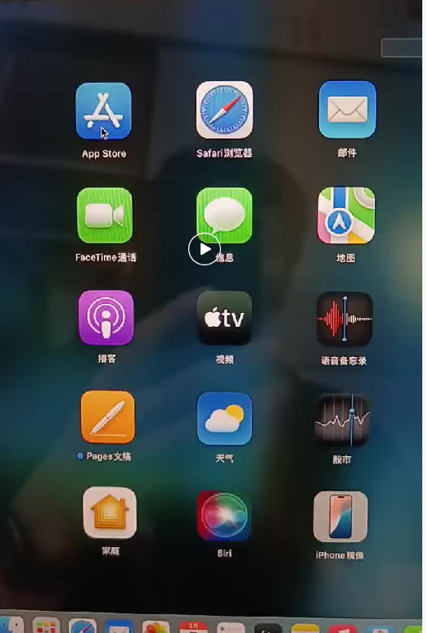
If you prefer a more stable solution, you can also purchase your own US Apple ID.
Step-by-Step Guide to Install V2Box on Mac #
Step 1: Open the App Store #
Open the App Store application on your Mac computer.
Step 2: Log Out of Your Current Apple ID #
If you are logged in with a local Apple ID, log out first.
Then log in with a US Apple ID.
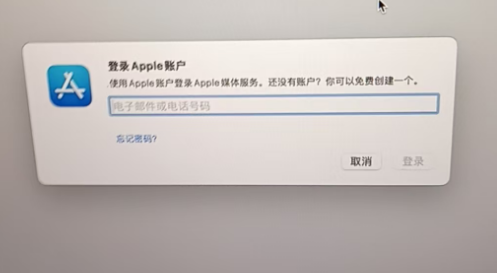
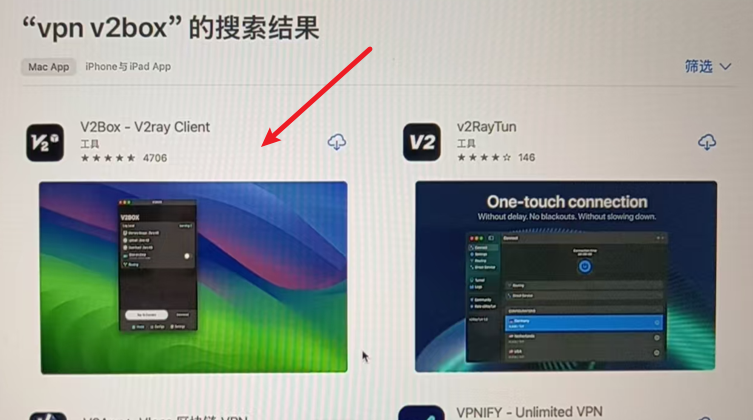
Step 3: Search for V2Box #
In the App Store search bar, type:
V2Box
Click Install to download the application.
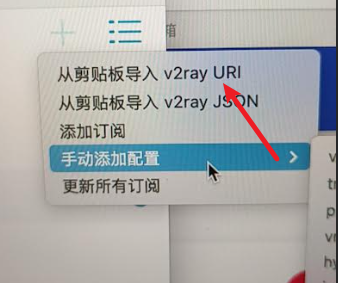
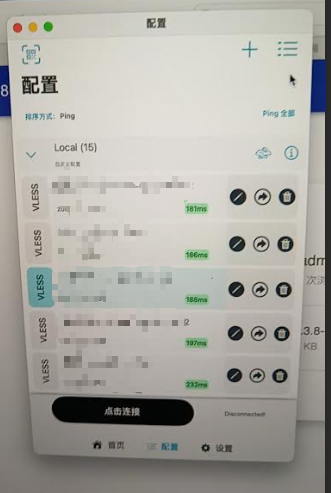
Step 4: Import Proxy Nodes #
After installation, open the application.
Click the "+" button in the top right corner.
You can import nodes using:
- Subscription links
- QR codes
- Manual configuration
Step 5: Connect to the Network #
After importing nodes successfully:
- Select a node
- Click Connect
You are now connected.
Recommended Proxy Services #
If you do not have your own node server, you can purchase traffic from proxy providers.
Notes #
- Traffic is pay-as-you-go
- No expiration time
- Use until the traffic is consumed
| Name | Price | Traffic | Nodes |
|---|---|---|---|
| Yifen | ¥12 | 100GB | 30 |
| Niubi | ¥14 | 200GB | 31 |
| Nongfu | ¥15 | 200GB | 40 |
| Mojie | ¥15 | 130GB | 48 |
| Speedy | ¥15 | 100GB | 42 |
| NetExpress | ¥16 | 100GB | 54 |
| LossAirport | ¥19 | 1000GB | 37 |
Why Free Proxy Nodes Are Dangerous #
Many users search for free V2Box nodes online.
However, there are significant risks.
Security Risks #
Free nodes may be operated by unknown individuals. Your traffic could be monitored.
Data Theft #
Attackers could potentially capture:
- Passwords
- Banking information
- Personal data
Unstable Connections #
Free nodes frequently:
- Go offline
- Become extremely slow
- Stop working without warning
For better stability and security, paid nodes are usually recommended.
Paid Node Information #
You can purchase a premium node subscription.
Price:
10 USDT per year
Supported regions include:
- United States
- France
- United Kingdom
- Singapore
- And several other countries
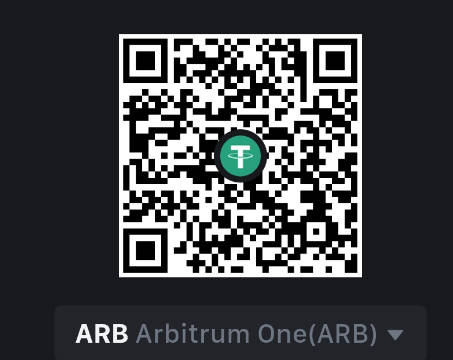
Payment Address (Arbitrum One) #
0x8d4744a8d6d617634d054edf9031bb5d77f2fd4b
Payment QR Code #
Contact Email:
[email protected]
Frequently Asked Questions (FAQ) #
Is V2Box Safe? #
Yes. V2Box is generally considered safe if you use trusted proxy servers.
However, avoid unknown free nodes.
Is V2Box Free? #
The application itself is free to download.
But you will still need proxy servers or subscription services to use it.
Can V2Box Be Used on iPhone? #
Yes.
V2Box supports:
- iPhone
- iPad
- Android
- macOS
Which Protocol Is Best? #
Currently, many users recommend:
- Reality
- Hysteria2
- VLESS
These protocols provide high speed and strong anti-blocking capabilities.
Final Thoughts #
V2Box has become one of the best proxy clients available today thanks to its powerful protocol support, modern interface, and cross-platform compatibility.
If you are looking for a secure and flexible proxy client for macOS, V2Box is an excellent choice.
By following this guide, you should now be able to:
- Download V2Box on Mac
- Install it successfully
- Import proxy nodes
- Connect to the internet securely