How to Download v2box on iPhone – Complete Guide #
v2box is a multi-platform network proxy tool that supports various protocols and works on iOS and Android. However, in some countries (such as China) it cannot be downloaded directly from the local App Store, so a US (overseas) Apple ID is required.
Below are several methods to obtain a US Apple ID.
1. Use Temporary / Shared IDs #
1.1 Shared Overseas Apple Accounts #
- Note: Some IDs may stop working — simply switch to another one
- After downloading the app, sign out of the Apple ID immediately
- Always sign in through the App Store, not through system Settings
- Last updated: September 11, 2026
| Account | Password |
|---|---|
| [email protected] | TzTx3!zd |
| [email protected] | x5Qt9ch9m9 |
| [email protected] | VG7j2eeg4C |
| [email protected] | 44s41NP3MD5pf3 |
| [email protected] | 44s4nrRa3yZnJ5 |
1.2 Buy a Ready-made US Apple ID #
- Click to buy a US Apple ID
- Can be used permanently after purchase

1.3 Buy an Airport Subscription and Receive a Temporary US ID #

- Click “Buy Subscription”
- Choose a suitable plan (1 CNY / 1G is recommended)

- Go to “Usage Tutorial” → “iPhone/iPad Tutorial” → find the shared ID section

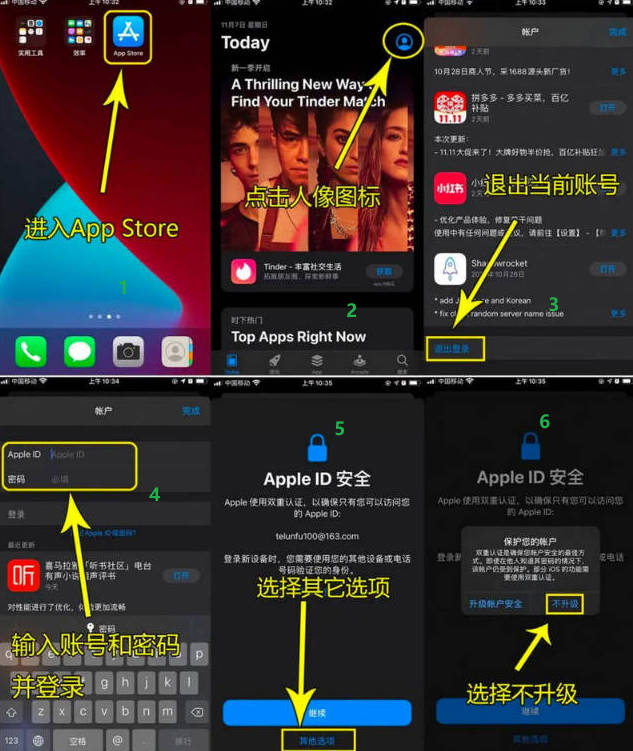
2. Sign in to the App Store and Download v2box #
Follow the steps shown in the image below:
Recommended Airports #
- The following services charge by traffic volume. Software usage and installation tutorials are available on their websites.
- After purchasing traffic there is no time limit — use until the traffic is exhausted.
| Name | Price | Traffic | Nodes |
|---|---|---|---|
| 魔戒 | 1 CNY | 1G | 30 |
| 网际快车 | 7 CNY | 20G | 54 |
| 牛逼 | 14 CNY | 200G | 31 |
| 飞兔 | 30 CNY | 100G | 80 |
| 农夫山泉 | 45 CNY | 200G | 40 |
| 宝贝云 | 55 CNY | 600G | 64 |
| 自由猫 | 89 CNY | 200G | 71 |
| fscloud | 99 CNY | 1000G | 82 |